This is the multi-page printable view of this section. Click here to print.
MySQL
- 1: Backup
- 2: Configuration
- 3: Importing Data
- 4: Importing Data From AWS RDS
- 5: Importing Data From GCP
- 6: Limitations
- 7: Overview
- 8: Restore
- 9: TLS Connection
- 10: User Management
1 - Backup
Percona Xtrabackup is used to create backups.
CCX backups the Primary server. In multi-primary setups the node with the highest wsrep_local_index is elected.
Backups are streamed directly to S3 staroge.
Percona Xtrabackup blocks DDL operations during the backup using the --lock-ddl flag.
Any attempt to CREATE, ALTER, DROP, TRUNCATE a table during backup creation will be locked with the status Waiting for backup lock (see SHOW FULL PROCESSLIST).
In this case, wait for the backup to finish and, perform the operation later.
Also see the section ‘Schedule’.
Schedule
The backup schedule can be tuned and backups can be paused.
2 - Configuration
max_connections
- 75 connections / GB of RAM.
- Example: 4GB of RAM yields 300 connections.
- This setting cannot be changed as it affects system stability.
InnoDB settings
- These setting cannot be changed as it affects system stability.
innodb_buffer_pool_size
- 50% of RAM if total RAM is > 4GB
- 25% of RAM if total RAM is <= 4GB
innodb_log_file_size
- 1024 MB if innodb_buffer_pool_size >= 8192MB
- 512 MB if innodb_buffer_pool_size < 8192MB
innodb_buffer_pool_instances
- 8
InnoDB options
| variable_name | variable_value |
|---|---|
| innodb_buffer_pool_size | Depends on instance size |
| innodb_flush_log_at_trx_commit | 2 |
| innodb_file_per_table | 1 |
| innodb_data_file_path | Depends on instance size |
| innodb_read_io_threads | 4 |
| innodb_write_io_threads | 4 |
| innodb_doublewrite | 1 |
| innodb_buffer_pool_instances | Depends on instance size |
| innodb_redo_log_capacity | 8G |
| innodb_thread_concurrency | 0 |
| innodb_flush_method | O_DIRECT |
| innodb_autoinc_lock_mode | 2 |
| innodb_stats_on_metadata | 0 |
| default_storage_engine | innodb |
General options
| variable_name | variable_value |
|---|---|
| tmp_table_size | 64M |
| max_heap_table_size | 64M |
| max_allowed_packet | 1G |
| sort_buffer_size | 256K |
| read_buffer_size | 256K |
| read_rnd_buffer_size | 512K |
| memlock | 0 |
| sysdate_is_now | 1 |
| max_connections | Depends on instance size |
| thread_cache_size | 512 |
| table_open_cache | 4000 |
| table_open_cache_instances | 16 |
| lower_case_table_names | 0 |
Storage
Recommended storage size
- We recommend a maximum of 100GB storage per GB of RAM.
- Example: 4GB of RAM yields 400GB of storage.
- The recommendation is not enforced by the CCX platform.
3 - Importing Data
This procedure describes how to import data to a MySQL datastore located in CCX.
- The MySQL Datastore on CCX is denoted as the ‘replica’
- The source of the data is denoted as the ‘source’
note:
If you dont want to setup replication, then you can chose to only apply the sections:
- Create a database dump file
- Apply the dumpfile on the replica
Preparations
Ensure that the source is configured to act as a replication source:
- Binary logging is enabled.
server_idis set to non 0.
Ensure the CCX Firewall is updated:
- Add the replication source as a Trusted Source in the Firewall section of the CCX UI.
Create a replication user on the source
Create a replication user with sufficient privileges on the source:
CREATE USER 'repluser'@'%' IDENTIFIED BY '<SECRET>';
GRANT REPLICATION SLAVE ON *.* TO  'repluser'@'%';
Prepare the replica to replicate from the source
The replica must be instructed to replicate from the source:
Make sure to change <SOURCE_IP>, <SOURCE_PORT>, and <SECRET>.
CHANGE REPLICATION SOURCE TO SOURCE_HOST=<SOURCE_IP>, SOURCE_PORT=<SOURCE_PORT>, SOURCE_USER='repluser', SOURCE_PASSWORD='<SECRET>', SOURCE_SSL=1;
Create a replication filter on the replica
The replica filter prevents corruption of the datastore.
If the datastore’s system tables are corrupted using replication then the SLA is void and the datastore must be recreated.
CHANGE REPLICATION FILTER REPLICATE_IGNORE_DB=(mysql,sys, performance_schema);
Create a database dump file
The database dump contains the data that you wish to import into the replica. Only partial dumps are possible. The dump must not contains any mysql or other system databases.
On the source, issue the following command. Change USER, SECRET and DATABASES:
mysqldump --set-gtid-purged=OFF -uUSER -pSECRET --master-data --single-transaction --triggers --routines --events --databases DATABASES > dump.sql
Important! If your database dump contains SPROCs, triggers or events, then you must replace DEFINER:
sed 's/\sDEFINER=`[^`]*`@`[^`]*`//g' -i dump.sql
Apply the dumpfile on the replica
cat dump.sql | mysql -uccxadmin -p -h<REPLICA_PRIMARY>
Start the replica
On the replica do:
START REPLICA;
followed by
SHOW REPLICA STATUS;
And verify that:
             Replica_IO_State: Waiting for source to send event
	     ..
  	     Replica_IO_Running: Yes
             Replica_SQL_Running: Yes
When the migration is ready
STOP REPLICA;
RESET REPLICA ALL;
CHANGE REPLICATION FILTER REPLICATE_IGNORE_DB=();
Troubleshooting
If the replication fails to start then verify:
- All the steps above has been followed.
- Ensure that the replication source is added as a Trusted Source in the Firewall section of the CCX UI.
- Ensure that you have the correct IP/FQDN of the replication source.
- Ensure that users are created correctly and using the correct password.
- Ensure that the dump is fresh.
4 - Importing Data From AWS RDS
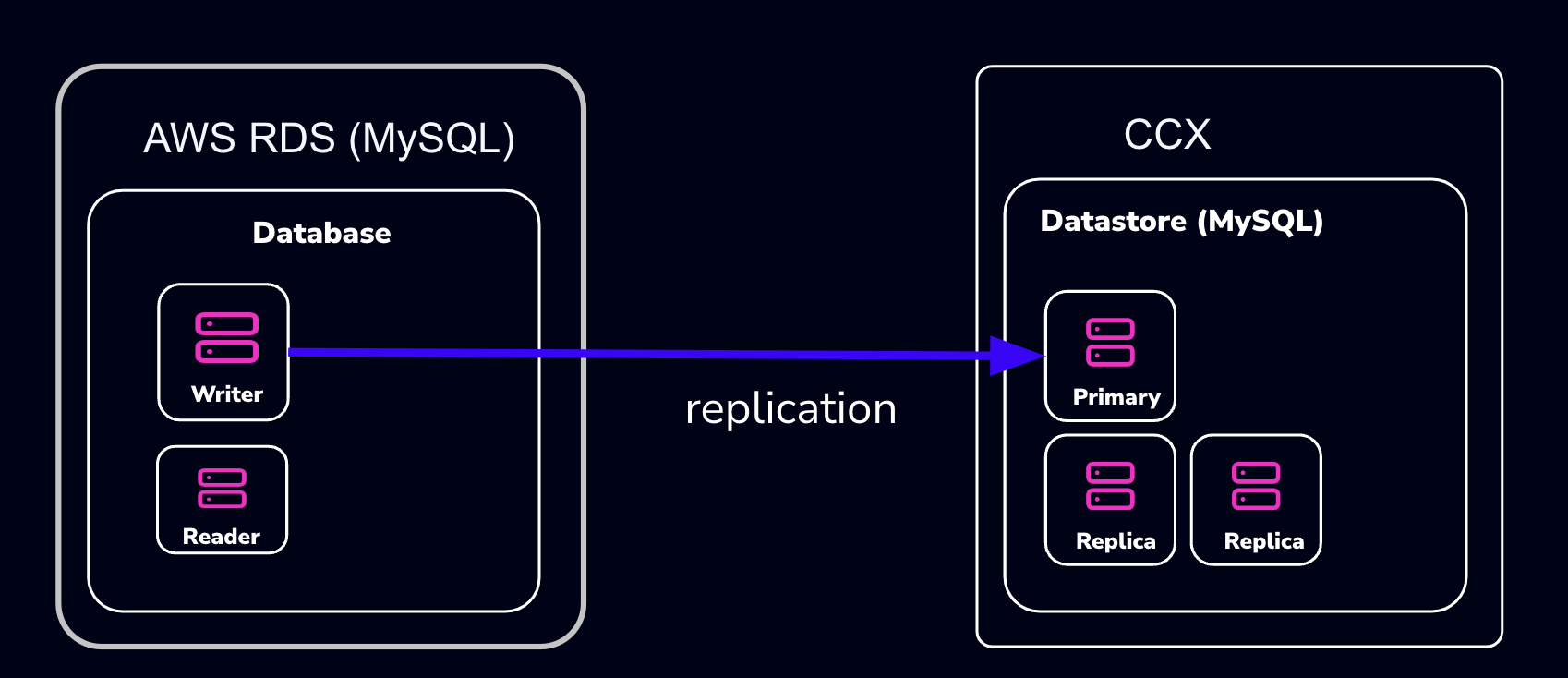
This procedure describes how to import data from Amazon RDS to a MySQL datastore located in CCX.
- The MySQL Datastore on CCX is referred to as the ‘CCX Primary’
- The RDS Source of the data is referred to as the ‘RDS Writer’
Schematically, this is what we will set up:
warning:
AWS RDS makes it intentionally difficult to migrate away from. Many procedures on the internet, as well as AWS’s own procedures, will not work.
The migration we suggest here (and is the only one we know works) requires that the RDS Writer instance be blocked for writes until a mysqldump has been completed. However, AWS RDS blocks operations such as
FLUSH TABLES WITH READ LOCK:mysqldump: Couldn't execute 'FLUSH TABLES WITH READ LOCK': Access denied for user 'admin'@'%' (using password: YES) (1045)Therefore, the actual applications must be blocked from writing.
Also, some procedures on the internet suggest creating a read-replica. This will not work either, as the AWS RDS Read-replica is crippled and lacks GTID support.
note:
If you don’t want to set up replication, you can choose to only apply the following sections:
- Create a database dump file of the RDS Writer
- Apply the dump file on the CCX replica
Also, practice this a few times before you actually do the migration.
Preparations
- Create a datastore on CCX. Note that you can also replicate from MySQL 8.0 to MySQL 8.4.
- Get the endpoint of the CCX Primary (under the Nodes section).
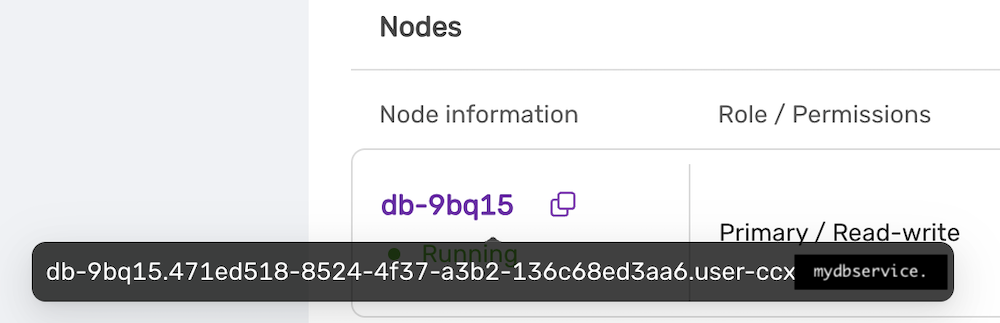 The endpoint in our case is
 db-9bq15.471ed518-8524-4f37-a3b2-136c68ed3aa6.user-ccx.mydbservice.net. - Get the endpoint of the RDS Writer. In this example, the endpoint is
database-1.cluster-cqc4xehkpymd.eu-north-1.rds.amazonaws.com - Update the Security group on AWS RDS to allow the IP address of the CCX Primary to connect. To get the IP address of the CCX Primary, run:
dig db-9bq15.471ed518-8524-4f37-a3b2-136c68ed3aa6.user-ccx.mydbservice.net - Ensure you can connect a MySQL client to both the CCX Primary and the RDS Writer.
Create a Replication User On the RDS Writer Instance
Create a replication user with sufficient privileges on the RDS Writer.
In the steps below, we will use repl and replpassword as the credentials when setting up the replica on CCX.
CREATE USER 'repl'@'%' IDENTIFIED BY 'replpassword';
GRANT REPLICATION SLAVE ON *.* TO  'repluser'@'%'; #mysql 8.0
GRANT REPLICATION REPLICATION_SLAVE_ADMIN ON *.* TO  'repluser'@'%';
Block Writes to the RDS Writer Instance
This is the most challenging part. You must ensure your applications cannot write to the Writer instance.
Unfortunately, AWS RDS blocks operations like FLUSH TABLES WITH READ LOCK.
Create a Consistent Dump
Assuming that writes are now blocked on the RDS Writer Instance, you must get the binary log file and the position of the RDS Writer instance.
Get the Replication Start Position
The start position (binary log file name and position) is used to tell the replica where to start replicating data from.
MySQL 8.0: SHOW MASTER STATUS\G
MySQL 8.4 and later: SHOW BINARY LOG STATUS\G
It will output:
 *************************** 1. row ***************************
             File: mysql-bin-changelog.000901
         Position: 584
     Binlog_Do_DB:
 Binlog_Ignore_DB:
Executed_Gtid_Set: 796aacf3-24ed-11f0-949d-0605a27ab4b9:1-876
1 row in set (0.02 sec)
Record the File: mysql-bin-changelog.000901 and the Position: 584 as they will be used to set up replication.
Create the mysqldump
Be sure to specify the database you wish to replicate. You must omit any system databases. In this example, we will dump the databases prod and crm.
mysqldump -uadmin -p -hdatabase-1.cluster-cqc4xehkpymd.eu-north-1.rds.amazonaws.com --databases prod crm --triggers --routines --events --set-gtid_purged=OFF --single-transaction > dump.sql
Wait for it to complete.
Unblock Writes to the RDS Writer Instance
At this stage, it is safe to enable application writes again.
Load the Dump On the Replica
Create a Replication Filter On the Replica
The replica filter prevents corruption of the datastore, and we are not interested in changes logged by AWS RDS to mysql.rds* tables anyway. Also add other databases that you do not wish to replicate to the filter.
note:
If the CCX datastore’s system tables are corrupted using replication, then the datastore must be recreated.
CHANGE REPLICATION FILTER REPLICATE_IGNORE_DB=(mysql, sys, performance_schema);
Important! If your database dump contains stored procedures, triggers, or events, then you must replace DEFINER:
sed 's/\sDEFINER=`[^`]*`@`[^`]*`//g' -i dump.sql
Apply the Dump File On the CCX Primary:
cat dump.sql | mysql -uccxadmin -p -hCCX_PRIMARY
Connect the CCX Primary to the RDS Writer Instance
The CCX Primary must be instructed to replicate from the RDS Writer. We have the binlog file and position from the earlier step:
- mysql-bin-changelog.000901
- 584
CHANGE REPLICATION SOURCE TO SOURCE_HOST='database-1.cluster-cqc4xehkpymd.eu-north-1.rds.amazonaws.com', SOURCE_PORT=3306, SOURCE_USER='repl', SOURCE_PASSWORD='replpassword', SOURCE_SSL=1, SOURCE_LOG_FILE='mysql-bin-changelog.000901', SOURCE_LOG_POS=584;
Start the Replica
On the replica, run:
START REPLICA;
followed by:
SHOW REPLICA STATUS;
And verify that:
             Replica_IO_State: Waiting for source to send event
	            ...
  	       Replica_IO_Running: Yes
          Replica_SQL_Running: Yes
When the Migration is Ready
At some point, you will need to point your applications to the new datastore. Ensure:
- Prevent writes to the RDS Writer
- Make sure the CCX Primary has applied all data (use
SHOW REPLICA STATUS) - Connect the applications to the new datastore
STOP REPLICA;
RESET REPLICA ALL;
CHANGE REPLICATION FILTER REPLICATE_IGNORE_DB=();
Troubleshooting
If the replication fails to start, verify:
- All the steps above have been followed
- Ensure that the IP address of the CCX Primary is added to the security group used by the RDS Writer instance
- Ensure that you have the correct IP/FQDN of the RDS Writer instance
- Ensure that users are created correctly and using the correct password
- Ensure that the dump is fresh
5 - Importing Data From GCP
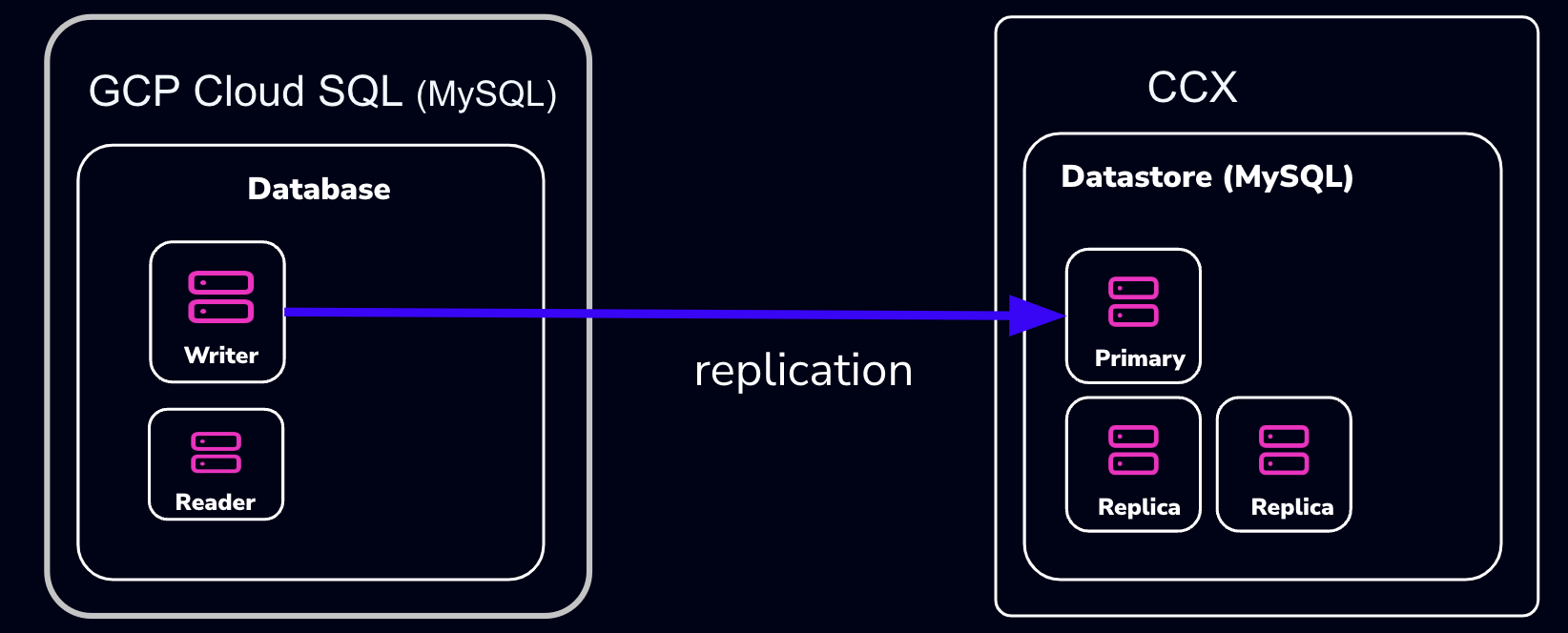
This procedure describes how to import data from Google Cloud SQL to a MySQL datastore located in CCX.
- The MySQL Datastore on CCX is referred to as the ‘CCX Primary’
- The GCP Source of the data is referred to as the ‘GCP Primary’
Schematically, this is what we will set up:
note:
If you don’t want to set up replication, you can choose to only apply the following sections:
- Create a database dump file of the GCP Primary
- Apply the dump file on the CCX replica
Also, practice this a few times before you actually do the migration.
Preparations
- Create a datastore on CCX. Note that you can also replicate from MySQL 8.0 to MySQL 8.4.
- Get the endpoint of the CCX Primary (under the Nodes section). The endpoint in our case is
db-9bq15.471ed518-8524-4f37-a3b2-136c68ed3aa6.user-ccx.mydbservice.net. - The GCP Primary must have a Public IP.
- Get the endpoint of the GCP Primary. In this example, the endpoint is
34.51.xxx.xxx - Update the Security group on GCP to allow the IP address of the CCX Primary to connect. To get the IP address of the CCX Primary, run:
dig db-9bq15.471ed518-8524-4f37-a3b2-136c68ed3aa6.user-ccx.mydbservice.net - Ensure you can connect a MySQL client to both the CCX Primary and the GCP Primary.
Create a Replication User on the GCP Primary Instance
Create a replication user with sufficient privileges on the GCP Primary.
In the steps below, we will use repl and replpassword as the credentials when setting up the replica on CCX.
CREATE USER 'repl'@'%' IDENTIFIED BY 'replpassword';
GRANT REPLICATION SLAVE ON *.* TO  'repluser'@'%'; #mysql 8.0
GRANT REPLICATION REPLICATION_SLAVE_ADMIN ON *.* TO  'repluser'@'%';
Create the mysqldump
Be sure to specify the database you wish to replicate. You must omit any system databases. In this example, we will dump the databases prod and crm.
mysqldump -uroot -p -h34.51.xxx.xxx --databases prod crm --triggers --routines --events --set-gtid_purged=OFF --source-data --single-transaction > dump.sql
Wait for it to complete.
Load the Dump on the Replica
Create a Replication Filter on the Replica
The replica filter prevents corruption of the datastore, and we are not interested in changes logged by GCP to mysql.rds* tables anyway. Also add other databases that you do not wish to replicate to the filter.
note:
If the CCX datastore’s system tables are corrupted using replication, then the datastore must be recreated.
CHANGE REPLICATION FILTER REPLICATE_IGNORE_DB=(mysql, sys, performance_schema);
Important! If your database dump contains stored procedures, triggers, or events, then you must replace DEFINER:
sed 's/\sDEFINER=`[^`]*`@`[^`]*`//g' -i dump.sql
Apply the Dump File on the CCX Primary:
cat dump.sql | mysql -uccxadmin -p -hCCX_PRIMARY
Connect the CCX Primary to the GCP Primary
Issue the following commands on the CCX Primary:
CHANGE REPLICATION SOURCE TO SOURCE_HOST='34.51.xxx.xxx', SOURCE_PORT=3306, SOURCE_USER='repl', SOURCE_PASSWORD='replpassword', SOURCE_SSL=1;
Start the Replica
On the CCX Primary, run:
START REPLICA;
followed by:
SHOW REPLICA STATUS\G
And verify that:
             Replica_IO_State: Waiting for source to send event
	     ..
  	     Replica_IO_Running: Yes
             Replica_SQL_Running: Yes
When the Migration is Ready
At some point, you will need to point your applications to the new datastore. Ensure:
- There are no application writes to the GCP Primary
- The CCX Primary has applied all data (use
SHOW REPLICA STATUS \G, check theSeconds_Behind_Master) - Connect the applications to the new datastore
Then you can clean up the replication link on the CCX Primary:
STOP REPLICA;
RESET REPLICA ALL;
CHANGE REPLICATION FILTER REPLICATE_IGNORE_DB=();
Troubleshooting
If the replication fails to start, verify:
- All the steps above have been followed
- Ensure that the IP address of the CCX Primary is added to the security group used by the GCP Primary instance
- Ensure that you have the correct IP/FQDN of the GCP Primary instance
- Ensure that users are created correctly and using the correct password
- Ensure that the dump is fresh
6 - Limitations
Every product has limitations. Here is a list MySQL limitations:
Permissions
The privilege system in MySQL is offers more capabilties than MariaDB. Hence, the ‘ccxadmin’ user has more privileges in MySQL than in MariaDB.
The ‘ccxadmin’ user has the following privileges:
- Global / all databases (
*.*):- SELECT, INSERT, UPDATE, DELETE, CREATE, DROP, RELOAD, PROCESS, REFERENCES, INDEX, ALTER, SHOW DATABASES, CREATE TEMPORARY TABLES, LOCK TABLES, EXECUTE, REPLICATION SLAVE, REPLICATION CLIENT, CREATE VIEW, REPLICATION_SLAVE_ADMIN, SHOW VIEW, CREATE ROUTINE, ALTER ROUTINE, CREATE USER, EVENT, TRIGGER, GRANT
This means that the ‘ccxadmin’ may assign privileges to users on all databases.
Restrictions:
‘ccxadmin’ is not allowed to modify the following databases
mysql.*sys.*
For those database, the following privileges have been revoked from ‘ccxadmin’:
- INSERT, UPDATE, DELETE, CREATE, DROP, REFERENCES, INDEX, ALTER, CREATE TEMPORARY TABLES, LOCK TABLES, EXECUTE, CREATE VIEW, SHOW VIEW, CREATE ROUTINE, ALTER ROUTINE, EVENT, TRIGGER
7 - Overview
CCX supports two types of MySQL clustering:
- MySQL Replication (Primary-replica configuration)
- Percona XtraDb Cluster (Multi-primary configuration)
For general purpose applications we recommend using MySQL Replication, and we only recommend to use Percona XtraDb Cluster if you are migrating from an existing application that uses Percona XtraDb Cluster.
If you are new to Percona XtraDb Cluster we stronly recommend to read about the Percona XtraDb Cluster limitations and Percona XtraDb Cluster Overview to understand if your application can benefit from Percona XtraDb Cluster.
MySQL Replication uses the standard asynchronous replication based on GTIDs.
Scaling
Storage and nodes can be scaled online.
Nodes (horizonal)
- The maximum number of database nodes in a datastore is 5.
- Multi-primary configuration must contain an odd number of nodes (1, 3 and 5).
Nodes (vertical)
A node cannot be scaled vertically currently. To scale to large instance type, then a larger instance must be added and then remove the unwanted smaller instances.
Storage
- Maximum size depends on the service provider and instance size
- Volume type cannot currently be changed
Further Reading
8 - Restore
There are two options to restore a backup:
- Restore a backup on the existing datastore
- Restore a backup on a new datastore
Please note that restoring a backup may be a long running process.
This option allows to restore a backup with point in time recovery. The WAL logs are replayed until the desired PITR. Warning! Running several restores may change the timelines.
This option allows to restore a backup on a new datastore. This option does not currently support PITR.
9 - TLS Connection
SSL Modes
CCX currently supports connections to MySQL in two SSL modes:
-
REQUIRED: This mode requires an SSL connection. If a client attempts to connect without SSL, the server rejects the connection. -
VERIFY_CA: This mode requires an SSL connection and the server must verify the client’s certificate against the CA certificates that it has.
CA Certificate
The Certificate Authority (CA) certificate required for VERIFY_CA mode can be downloaded from your datastore on CCX using an API call or through the user interface on page https://{your_ccx_domain}/projects/default/data-stores/{datastore_id}/settings.
This certificate is used for the VERIFY_CA SSL mode.
Example Commands
Here are example commands for connecting to the MySQL server using the two supported SSL modes:
-
REQUIREDmode:mysql --ssl-mode=REQUIRED -u username -p -h hostname -
VERIFY_CAmode:mysql --ssl-mode=VERIFY_CA --ssl-ca=ca.pem -u username -p -h hostname
require_secure_transport
This is a MySQL setting that governs if connections to the datastore are required to use SSL. You can change this setting in CCX in Settings -> DB Parameters:
| Scenario | Server Parameter Settings | Description |
|---|---|---|
| Disable SSL enforcement | require_secure_transport = OFF |
This is the default to support legacy applications. If your legacy application doesn’t support encrypted connections, you can disable enforcement of encrypted connections by setting require_secure_transport=OFF. However, connections are encrypted unless SSL is disabled on the client. See examples |
| Enforce SSL | require_secure_transport = ON |
This is the recommended configuration. |
Examples
ssl-mode=DISABLED and require_secure_transport=OFF
mysql -uccxadmin -p -h...  -P3306 ccxdb --ssl-mode=disabled
...
mysql> \s
--------------
...
Connection id:		52
Current database:	ccxdb
Current user:		ccxadmin@...
*SSL:			Not in use*
Current pager:		stdout
...
ssl-mode=PREFERRED and require_secure_transport=OFF
mysql -uccxadmin -p -h...  -P3306 ccxdb --ssl-mode=preferred
...
mysql> \s
--------------
...
Connection id:		52
Current database:	ccxdb
Current user:		ccxadmin@...
SSL:			Cipher in use is TLS_AES_256_GCM_SHA384
Current pager:		stdout
...
ssl-mode=DISABLED and require_secure_transport=ON
mysql -uccxadmin -p -h...  -P3306 ccxdb --ssl-mode=disabled
mysql: [Warning] Using a password on the command line interface can be insecure.
ERROR 3159 (08004): Connections using insecure transport are prohibited while --require_secure_transport=ON.
ssl-mode=PREFERRED|REQUIRED and require_secure_transport=ON
mysql -uccxadmin -p -h...  -P3306 ccxdb --ssl-mode=preferred|required
mysql> \s
--------------
...
Connection id:		52
Current database:	ccxdb
Current user:		ccxadmin@...
SSL:			Cipher in use is TLS_AES_256_GCM_SHA384
Current pager:		stdout
...
tls_version
The tls_version is set to the following by default:
| Variable_name | Value |
|---|---|
| tls_version | TLSv1.2,TLSv1.3 |
10 - User Management
CCX supports creating database users from the web interface. The database user has the following privileges:
- Global / all databases (
*.*):- SELECT, INSERT, UPDATE, DELETE, CREATE, DROP, RELOAD, PROCESS, REFERENCES, INDEX, ALTER, SHOW DATABASES, CREATE TEMPORARY TABLES, LOCK TABLES, EXECUTE, REPLICATION SLAVE, REPLICATION CLIENT, CREATE VIEW, REPLICATION_SLAVE_ADMIN, SHOW VIEW, CREATE ROUTINE, ALTER ROUTINE, CREATE USER, EVENT, TRIGGER, GRANT
This means that the database user may assign privileges to users on all databases.
Restrictions:
The database user is not allowed to modify the following databases
mysql.*sys.*
For those database, the following privileges have been revoked from ‘ccxadmin’:
- INSERT, UPDATE, DELETE, CREATE, DROP, REFERENCES, INDEX, ALTER, CREATE TEMPORARY TABLES, LOCK TABLES, EXECUTE, CREATE VIEW, SHOW VIEW, CREATE ROUTINE, ALTER ROUTINE, EVENT, TRIGGER